# Tasklynx Documentation
Tasklynx is a local-first task manager for developers. It combines a scriptable CLI, an interactive terminal Kanban board, and a small web dashboard on top of a single JSON store — with Git-style branches for parallel work.
- **Version:** 0.0.1-b4
- **AI Reader:** [`llms.txt`](https://peekstore.github.io/tasklynx/llms.txt) · [`llms-full.txt`](https://peekstore.github.io/tasklynx/llms-full.txt)
- **License:** [MIT](https://github.com/peekstore/tasklynx/blob/main/LICENSE)
- **Repository:** [github.com/peekstore/tasklynx](https://github.com/peekstore/tasklynx)
- **Releases:** [github.com/peekstore/tasklynx/releases](https://github.com/peekstore/tasklynx/releases)
## Current release
[`v0.0.1-b4`](https://github.com/peekstore/tasklynx/releases/tag/v0.0.1-b4) is the current prerelease. It includes:
- Git-aware branches, commit/PR/issue links, TODO scanning, and opt-in commit trailers.
- Optional AI plan, breakdown, triage, standup, review, and ask commands that preview before writing (provider support requires a source build).
- Recurring tasks, dependencies, subtasks, saved views, bulk completion, undo, and trash.
- Local time tracking, due-date reminders, and JSON, Markdown, or iCalendar export.
- CLI, terminal Kanban board, and web dashboard with an AI copilot panel.
See the [changelog](https://github.com/peekstore/tasklynx/blob/main/CHANGELOG.md) for release details.
## Start here
| Guide | What it covers |
| --- | --- |
| [Getting Started](getting-started.md) | Install, initialize, and complete your first task |
| [Installation](installation.md) | Every install method, updates, and uninstall |
| [CLI Reference](cli.md) | Commands, flags, and examples |
| [Configuration](configuration.md) | Config file, data paths, saved views, Git, and AI |
| [Git Integration](git-integration.md) | Branch mapping, commit links, scanning, and hooks |
| [AI Setup](ai-setup.md) | Providers, privacy controls, and the optional `ai` feature |
## Understand the project
| Guide | What it covers |
| --- | --- |
| [Architecture](architecture.md) | Modules, data flow, Git, AI, and storage design |
| [Development](development.md) | Build, test, and release workflow |
| [Deployment](deployment.md) | Release artifacts, Pages, and containers |
## Help
| Guide | What it covers |
| --- | --- |
| [Troubleshooting](troubleshooting.md) | Common problems and fixes |
| [FAQ](faq.md) | Frequently asked questions |
| [Screenshots](screenshots.md) | Interface previews |
## At a glance
```bash
# Install (Linux, macOS, Termux)
curl -fsSL https://raw.githubusercontent.com/peekstore/tasklynx/main/installer.sh | sh
# Create and track your first task
tx init
TASK_ID=$(tx add "Ship the prerelease" --priority high --due 2026-12-31 --estimate 120)
tx start "$TASK_ID"
tx next --explain
tx complete "$TASK_ID"
tx agenda --days 14
tx board
```
[Back to README](https://github.com/peekstore/tasklynx/blob/main/README.md)
--- (site) ---
# AI Setup
AI is opt-in. The default build has no networking dependency and the default provider is `none`.
## Build with AI support
```bash
cargo build --features ai
# or install the feature-enabled build:
cargo install --git https://github.com/peekstore/tasklynx.git --locked --features ai
```
The `ollama` and `openai-compatible` providers are compiled only with the `ai` feature. Official release binaries are built without it, so installers and package-manager releases support offline triage but not provider-backed AI. Core task management and offline triage work without the feature.
## Configure a provider
Add an `[ai]` table to `config.toml`:
```toml
[ai]
provider = "none"
model = "llama3.1"
endpoint = "http://127.0.0.1:11434"
max_context_tasks = 50
include_descriptions = true
redact = true
```
| Key | Default | Purpose |
| --- | --- | --- |
| `provider` | `"none"` | `none`, `ollama`, or `openai-compatible` |
| `model` | `"llama3.1"` | Model name sent to the provider |
| `endpoint` | `"http://127.0.0.1:11434"` | Provider base URL |
| `max_context_tasks` | `50` | Maximum open tasks included in prompt context |
| `include_descriptions` | `true` | Include task descriptions in context |
| `redact` | `true` | Redact common secret patterns before sending prompts |
Set `TASKLYNX_AI_API_KEY` for hosted OpenAI-compatible endpoints. API keys are never written to `config.toml`.
## Ollama
```toml
[ai]
provider = "ollama"
model = "llama3.1"
endpoint = "http://127.0.0.1:11434"
```
```bash
tx ai doctor
```
## OpenAI-compatible endpoints
```toml
[ai]
provider = "openai-compatible"
model = "gpt-4.1-mini"
endpoint = "https://api.openai.com/v1"
```
```bash
export TASKLYNX_AI_API_KEY="your-api-key"
tx ai doctor
```
Include the API version path in `endpoint`, such as `/v1` or `/v1beta/openai`.
## Google Gemini
```toml
[ai]
provider = "openai-compatible"
model = "gemini-2.5-flash"
endpoint = "https://generativelanguage.googleapis.com/v1beta/openai"
```
```bash
export TASKLYNX_AI_API_KEY="your-ai-studio-key"
tx ai doctor
```
## Commands
```bash
tx ai plan "Ship the billing API"
tx ai plan "Ship the billing API" --project api --limit 8 --apply
tx ai breakdown
tx ai breakdown --apply
tx ai triage
tx ai triage --offline --include-blocked
tx ai standup --days 1 --project api
tx ai review feature-auth --days 14
tx ai ask "What should I do next?"
tx ai ask "What changed this week?" --branch main --project api
```
- Mutating commands preview by default and require `--apply`.
- `tx ai triage` falls back to deterministic `tx next` ranking when no provider is configured or `--offline` is passed.
- `--limit N`, `--project`, `--branch`, and `--no-description` tighten context.
- CLI, TUI, and web expose the same preview and apply behavior.
## Privacy and safety
- AI commands are the only code path that can send task data to a provider.
- Context is limited to the selected project and branch.
- Common secrets are redacted when `ai.redact` is enabled.
- Prompt contents are never logged. `TASKLYNX_AI_LOG=1` logs prompt size and provider latency only.
- Responses are validated against a strict schema before tasks are created.
- Blocked tasks are excluded from triage unless explicitly requested.
- AI output never auto-completes, auto-deletes, or auto-commits anything.
## Troubleshooting
```bash
tx ai doctor
```
Use `tx ai doctor` to check provider reachability, model availability, and configuration. If the binary was built without the `ai` feature, provider-backed commands explain how to rebuild.
--- (site) ---
# Architecture
Tasklynx is a small synchronous CLI with two optional front ends. This page describes the module layout, data flow, and storage guarantees.
## Modules
| File | Purpose |
| --- | --- |
| `src/main.rs` | Clap definitions, command dispatch, and user-facing output |
| `src/model.rs` | `Task`, `Status`, `Priority`, `ProjectData`, `AppConfig`, date parsing |
| `src/store.rs` | JSON load/save with atomic writes, lookup helpers, export |
| `src/reminders.rs` | Due-task reminders, desktop notifications, and iCalendar export |
| `src/config.rs` | Config load/save and path resolution |
| `src/templates.rs` | Built-in task templates for `tx add --template` |
| `src/duplicates.rs` | Normalized title similarity and duplicate detection |
| `src/git.rs` | Repository discovery, branch mapping, commit scanning, and hooks |
| `src/ai.rs` | Provider abstraction, prompt building, response validation, redaction |
| `src/tui.rs` | Ratatui terminal Kanban board |
| `src/web.rs` | Axum server, REST endpoints, embedded assets |
| `build.rs` | Windows icon embedding |
## Data flow
```mermaid
graph LR
CLI[main.rs] --> Model[model.rs]
CLI --> Store[store.rs]
CLI --> TUI[tui.rs]
CLI --> Web[web.rs]
CLI --> Config[config.rs]
CLI --> Git[git.rs]
CLI --> AI[ai.rs]
CLI --> Reminders[reminders.rs]
Git -. local metadata .-> Repo[(Git repository)]
Store --> JSON[(tasks.json)]
Config --> TOML[(config.toml)]
AI -. optional feature .-> Provider[(Ollama / OpenAI-compatible)]
```
`main.rs` loads `ProjectData` once, dispatches the subcommand, mutates the in-memory model, and saves it back. The TUI and web server receive a snapshot of the same data; the web server holds it behind a mutex and persists changes on each write.
## Data model
`ProjectData` is the root document:
```json
{
"version": 1,
"current_branch": "main",
"branches": ["main"],
"tasks": []
}
```
Each `Task` carries an ID, title, description, status (`todo`/`doing`/`done`), priority (`low`/`normal`/`high`/`urgent`), project, branch, tags, optional due date, optional estimate, local time entries, timestamps, recurrence settings, blocker and subtask links, Git source metadata, and optional commit/PR/issue URLs. A time entry with no end timestamp is the active timer.
Serde deserialization uses defaults for missing fields, so older stores keep loading as the schema grows. `version` exists to support future migrations.
## Storage guarantees
- **One file** — `tasks.json` in the platform data directory, or under `TASKLYNX_HOME`.
- **Atomic writes & durability** — the store serializes to `tasks.json.tmp`, calls `sync_all()` for filesystem durability, and renames over the target. A crash cannot leave a partially written file.
- **Cross-process safety** — mutating operations acquire an advisory file lock (`.lock`) with timeout and stale-lock recovery, preventing race conditions between concurrent CLI or web server instances.
## Config
Saved list views are stored in `config.toml` under `[views.]`. They contain optional project, tag, status, and search filters plus the branch scope.
Config is separate from data:
- `~/.config/peekstore/tasklynx/config.toml` (or `$XDG_CONFIG_HOME/...`).
- Missing or partial config safely falls back to `AppConfig::default()`.
- The `[git]` table controls branch mapping, automatic Git metadata on `tx add`, and commit linking.
- The `[ai]` table controls opt-in provider selection, model, endpoint, context limits, and redaction.
## AI planning
- `src/ai.rs` defines a small `Provider` trait and an offline `none` provider.
- `ollama` and `openai-compatible` HTTP providers are compiled only with the `ai` Cargo feature.
- Default builds, including official release binaries, make no AI network calls and have no HTTP client dependency. Provider-backed AI requires a source build with `--features ai`.
- Prompt context defaults to open tasks on the current branch, can be narrowed with `--project` or `--branch`, and is capped by `ai.max_context_tasks`.
- Common secrets are redacted when `ai.redact` is enabled.
- AI responses are parsed into a strict JSON schema and validated before any task is created.
- `tx ai plan` and `tx ai breakdown` preview by default; `--apply` is required to persist tasks.
- `tx ai triage` falls back to the deterministic `tx next` ranking when no provider is configured; AI triage output must resolve to known task IDs.
- `tx ai standup`, `tx ai review`, and `tx ai ask` return validated reports/answers and never mutate the store.
- Web AI endpoints generate previews and use separate apply endpoints for plan and breakdown drafts.
## Web server
- Built on `axum` and `tokio`.
- Serves an embedded single-page application and SVG favicon via `include_str!`, keeping the binary fully self-contained.
- JSON API: `GET /api/tasks`, `POST /api/tasks`, `PUT /api/tasks/{id}`, `DELETE /api/tasks/{id}`.
- AI API: `POST /api/ai/triage`, `/plan`, `/apply-plan`, `/breakdown`, `/apply-breakdown`, `/standup`, `/review`, and `/ask`. Provider calls run on `spawn_blocking`.
- Hardened with `DefaultBodyLimit` (2MB) and security headers (`CSP`, `nosniff`, `X-Frame-Options: DENY`, `no-referrer`).
- Binds to `127.0.0.1:8787` by default.
## TUI
- Built on `ratatui` and `crossterm`.
- Interactive 3-column Kanban workspace supporting cursor navigation (`j`/`k`), column switching (`h`/`l`), status advancement (`Space`), completion toggle (`x`), and branch cycling (`b`).
- Detail pane shows the selected task and supports preview-only AI breakdown (`a`) and triage (`t`); `c` clears the AI result.
## Design constraints
- **Single binary** — no runtime assets or external dynamic libraries.
- **Local-first** — no network calls by default; AI networking requires the `ai` feature plus an explicit `tx ai` command, and `tx self update` shells out to the installer explicitly.
- **Small default dependency surface** — clap, clap_complete, clap_mangen, serde, chrono, uuid, anyhow, dirs, ratatui, crossterm, axum, tokio, toml.
- **Optional AI networking** — the `ai` feature adds the HTTP client for Ollama and OpenAI-compatible providers; default builds stay network-free.
[Back to README](https://github.com/peekstore/tasklynx/blob/main/README.md)
--- (site) ---
# CLI Reference
Tasklynx installs two command names that behave identically:
- `tasklynx`
- `tx` (short alias)
Examples below use `tx`. Run `tx --help` for the authoritative flag list.
## Global options
```bash
tx --help
tx --version
```
Running `tx` with no subcommand opens the terminal board.
## Commands
| Command | Description |
| --- | --- |
| `tx init` | Initialize the data store and config |
| `tx add ` | Add a task |
| `tx list` | List tasks on the current branch |
| `tx view <save\|list\|show\|run\|delete>` | Manage saved filters and views |
| `tx doing <id>` | Mark a task in progress |
| `tx start <id>` | Start a local timer and mark a task in progress |
| `tx stop` | Stop the running timer |
| `tx time [id]` | Show tracked time versus estimates |
| `tx complete <id> [--commit <sha>]` | Mark a task done and optionally link a commit |
| `tx reopen <id>` | Reopen a completed task |
| `tx next` | Show the best next task to work on |
| `tx delete <id>` | Move a task to trash |
| `tx undo` | Undo the most recent CLI mutation |
| `tx trash list` | List trashed tasks |
| `tx trash restore <id>` | Restore a trashed task |
| `tx trash purge` | Permanently remove trashed tasks |
| `tx edit <id>` | Edit task fields |
| `tx duplicate <id>` | Duplicate a task |
| `tx duplicates [--threshold N]` | Find tasks with similar titles |
| `tx search <query>` | Search titles, descriptions, and tags |
| `tx today` | Show tasks due today or overdue |
| `tx agenda [--days N]` | Show upcoming, overdue, and recurring work |
| `tx remind [--days N] [--notify]` | Show due and overdue work, optionally with a desktop notification |
| `tx block <id> --by <blocker>` | Mark a task as blocked by another |
| `tx unblock <id> [--by <blocker>]` | Remove one or all blockers |
| `tx subtask <parent> <title>` | Create a subtask under a parent |
| `tx tree [id] [--all]` | Show parent/child task trees |
| `tx stats` | Show task and branch totals |
| `tx branch` | Manage branches |
| `tx git status` | Show Git and Tasklynx branch context |
| `tx git link <id>` | Link a task to a commit, PR, or issue |
| `tx git sync [--limit N]` | Link tasks from commit trailers or subject IDs |
| `tx git scan` | Find TODO/FIXME/HACK comments in tracked files |
| `tx git open <id>` | Open a task commit, PR, or issue in the browser |
| `tx git hook` | Install or remove the Tasklynx Git hook |
| `tx git activate <id>` | Mark a task active for commit trailers |
| `tx git deactivate` | Clear the active commit task |
| `tx ai plan <goal>` | Draft a task plan with an AI provider |
| `tx ai breakdown <id>` | Draft subtasks for an existing task |
| `tx ai triage` | Rank the next tasks; offline fallback when no provider is configured |
| `tx ai standup` | Summarize recent work for a daily standup |
| `tx ai review [branch]` | Summarize open, blocked, and completed branch work |
| `tx ai ask <question>` | Ask a grounded question about task context |
| `tx ai doctor` | Check AI provider and model configuration |
| `tx export` | Export tasks as JSON, Markdown, or iCalendar |
| `tx import [path]` | Import JSON or Markdown (`--format`, `--replace`) |
| `tx web` | Start the web dashboard |
| `tx board` | Open the terminal Kanban board |
| `tx completions <shell>` | Generate shell completions |
| `tx man` | Render the roff manual page |
| `tx config` | Manage configuration |
| `tx self update` | Update to the latest release |
| `tx self uninstall [--purge]` | Remove the installation, optionally with data/config |
## Task IDs
Every task has a UUID. Any unique prefix is accepted wherever an `<id>` is expected:
```bash
tx complete 3f9c
```
If the prefix is ambiguous or missing, the command exits with an error.
## Adding tasks
```bash
tx add "Task title" \
--project default \
--tag bug,ui \
--priority normal \
--due 2026-12-31
```
| Flag | Short | Default | Notes |
| --- | --- | --- | --- |
| `--project <name>` | `-p` | `default` | Project name |
| `--tag <tags>` | `-t` | none | Comma-separated list |
| `--priority <level>` | `-P` | `normal` | `low`, `normal`, `high`, `urgent` |
| `--due <YYYY-MM-DD>` | — | none | Due at 23:59:59 local time |
| `--description <text>` | `-d` | none | Full task description |
| `--estimate <minutes>` | — | none | Estimated effort in minutes |
| `--commit <sha>` | — | none | Link a Git commit when the task is created |
| `--repeat <kind>` | — | none | `daily`, `weekly`, `monthly`, `yearly`, or `none` |
| `--repeat-until <YYYY-MM-DD>` | — | none | Stop creating occurrences after this date |
| `--template <name>` | — | none | Apply a built-in task template |
`tx add` prints only the full task UUID, which makes it easy to capture in a shell variable:
```bash
TASK_ID=$(tx add "Write migration" --priority high --estimate 90)
tx start "$TASK_ID"
```
`--repeat-until` requires `--repeat`. Completing a recurring task creates the next occurrence with the due date advanced; reopening a completed occurrence does not generate duplicates.
### Templates
```bash
tx add --template review
tx add "Review authentication" --template review
tx add --template bug --priority low
```
Available templates are `review`, `bug`, `feature`, `test`, and `chore`. A template supplies a default title, priority, tags, description, and estimate. Explicit flags override template values, and explicit `--tag` values are merged with template tags. `--template review` can be used without a title; otherwise a title is required.
### Recurring tasks
```bash
tx add "Weekly review" --due 2026-11-06 --repeat weekly
tx add "Pay invoices" --due 2026-12-01 --repeat monthly --repeat-until 2027-12-01
tx edit <id> --repeat daily --repeat-until 2026-11-30
tx edit <id> --repeat none
```
`tx list` and `tx tree` mark recurring tasks with a `↻` indicator and the repeat interval.
## Listing and filtering
```bash
tx list
tx list --project api
tx list --tag backend
tx list --status todo
tx list --status doing
tx list --status done
tx list --search auth
tx list --all
```
| Flag | Description |
| --- | --- |
| `--project <name>` | Only tasks in a project |
| `--tag <tag>` | Only tasks with a tag |
| `--status <status>` | `todo`, `doing`, or `done` |
| `--search <text>` | Case-insensitive title/description match |
| `--all` | Include tasks from every branch |
| `--view <name>` | Apply a saved view |
| `--save <name>` | Save the current filter as a view |
Output is one task per line:
```
3f9c1a2b todo high api Implement authentication
```
Columns are: short ID, status, priority, project, title.
### Saved views
```bash
tx view save api --project api --tag backend
tx view list
tx view show api
tx view run api
tx list --view api
tx list --save todo --status todo
tx view delete api
```
Saved views live in `config.toml` under `[views.<name>]`. `tx list --view <name>` runs a saved filter, and flags passed alongside it override the saved values. `tx list --save <name>` saves the current filter. `tx view run <name>` is equivalent to `tx list --view <name>`, while `tx view show <name>` prints the saved filter definition.
## Editing tasks
```bash
tx edit <id> --title "New title"
tx edit <id> --description "More detail"
tx edit <id> --priority high
tx edit <id> --project backend
tx edit <id> --due 2026-12-31
tx edit <id> --estimate 90
tx edit <id> --commit <sha>
tx edit <id> --repeat weekly --repeat-until 2026-12-31
tx edit <id> --add-tag urgent
tx edit <id> --remove-tag stale
```
`--add-tag` and `--remove-tag` can be repeated or passed comma-separated for `--add-tag`. Setting `--repeat none` clears the repeat interval and `--repeat-until`.
## Status changes
```bash
tx doing <id>
tx complete <id>
tx complete <id> --commit <sha>
tx reopen <id>
```
Completing a task records `completed_at`; reopening clears it and returns the task to `todo`. Completing or deleting a task automatically stops its running timer. `tx complete --commit` links the supplied commit as part of the same atomic update.
Bulk completion closes every open task due on or before a date:
```bash
tx complete --done-before 2026-10-31
tx complete --done-before 2026-10-31 --all
tx complete --done-before 2026-10-31 --force
```
Bulk completion uses the current branch unless `--all` is passed. Parents with open subtasks are skipped unless `--force` is used. The whole batch is saved as one undo step.
## Time tracking
```bash
tx add "Write migration" --estimate 45
tx start <id>
tx stop
tx time
tx time <id>
```
`tx start` records a local session and moves the task to `doing`. Only one timer can run at a time; `tx stop` closes it. Completion and deletion also close an active session.
`tx time` lists tasks with tracked sessions and their estimate versus actual time. `tx time <id>` shows the estimate, actual total, and each session's start/end timestamps. Running sessions are marked `active` and count toward the total. Estimates and sessions stay local in `tasks.json`.
## Searching, today, agenda, and stats
```bash
tx search auth
tx today
tx agenda
tx agenda --days 14
tx stats
```
- `search` matches title, description, and tags (case-insensitive).
- `today` prints `OVERDUE` or `TODAY` followed by the short ID and title.
- `agenda` prints upcoming work, including recurring tasks, within the next N days (default 7).
- `stats` prints `tasks=… done=… open=… overdue=… branches=… projects=…`.
## Duplicate detection
```bash
tx duplicates
tx duplicates --threshold 0.8
tx duplicates --all
```
`tx duplicates` compares open task titles and prints similar pairs with a score. The default threshold is `0.72`; use `--all` to compare across branches. `tx add` also prints a warning when a new title looks similar to an existing open task, but still creates the task.
## Reminders and calendar
```bash
tx remind
tx remind --days 7
tx remind --notify
tx export --format ics > tasklynx.ics
```
`tx remind` lists open tasks that are overdue or due within the next N days (default 3). Rows are labeled `OVERDUE`, `TODAY`, or `UPCOMING` and show the short ID, due date, priority, and title. Completed tasks and tasks without a due date are skipped.
`--notify` sends one desktop notification after printing the list. It is opt-in and daemon-free: Linux uses `notify-send`, macOS uses `osascript`, and other platforms report that notifications are unsupported. Use `tx remind` without `--notify` if a notification helper is unavailable.
`tx export --format ics` writes a standards-based iCalendar file for tasks with due dates. Each task becomes an all-day event, recurring tasks include an `RRULE`, and completed tasks are marked `STATUS:COMPLETED`.
## Choosing the next task
```bash
tx next
tx next --project api
tx next --explain
tx next --include-blocked
tx next --all
```
`tx next` ranks open tasks by priority, due date, and status. Blocked tasks are skipped unless `--include-blocked` is passed. `--all` includes every branch, and `--explain` prints the ranking inputs.
## Dependencies and subtasks
```bash
tx block <id> --by <blocker-id>
tx unblock <id> --by <blocker-id>
tx unblock <id>
tx subtask <parent-id> "Write migration"
tx tree
tx tree <parent-id>
tx tree --all
```
A task is blocked while any task in `blocked_by` is still open. `tx tree` defaults to the current branch; pass `--all` to include every branch. Completing a parent with open subtasks requires `--force`:
```bash
tx complete <parent-id> --force
```
Subtasks inherit the parent's project, branch, and priority unless you pass `--priority` or `--due`.
## Undo and trash
```bash
tx delete <id>
tx undo
tx trash list
tx trash restore <id>
tx trash purge
```
Deleting a task moves it to trash instead of removing it immediately. `tx undo` restores the store to its state before the most recent successful mutation, including CLI commands, web edits, and board sessions. The trash can be emptied permanently with `tx trash purge`.
## Git integration
```bash
tx git status
tx git link <id>
tx git link <id> --commit <sha>
tx git link <id> --pr https://github.com/owner/repo/pull/42
tx git link <id> --issue https://github.com/owner/repo/issues/7
tx git open <id>
tx git open <id> --print
```
`tx git status` reports the repository root, Git branch, mapped Tasklynx branch, HEAD, remote, workspace clean/dirty state, recent commits, and open tasks on the current Tasklynx branch. `tx git link` stores the commit, Git branch, and remote URL on the task. When `--commit` is omitted, `HEAD` is used. `--pr` stores a pull request or merge request URL, and `--issue` stores an issue URL.
With `[git] auto_branch = true` (the default), `tx add` maps the current Git branch to a Tasklynx branch by stripping `branch_prefix` (`tx/auth` becomes `auth`) and switches to it. With `link_commits = true`, the new task also records the current Git branch, remote, and `HEAD` commit. Set either option to `false` to keep manual branch and commit linking.
`tx git open` opens the task's PR URL when present, then its issue URL, and otherwise its commit URL. Use `--print` to print the URL without launching a browser.
### Scanning code comments
```bash
tx git scan
tx git scan --apply
tx git scan --apply --project backend --limit 50
```
`tx git scan` searches tracked files for `TODO`, `FIXME`, and `HACK` comments. Preview mode prints file paths and line numbers without changing the store. `--apply` creates tasks with the source path, line number, Git commit, and branch attached. `--project` sets the destination project and `--limit` caps results (default 100). Already-scanned locations are skipped, so rerunning the command is safe. Vendored and generated directories such as `vendor/`, `node_modules/`, `target/`, `build/`, and `dist/` are skipped.
### Commit trailers and hooks
```bash
tx git activate <id>
tx git hook install
git commit -m "Implement authentication"
tx git sync
git commit -m "More work <short-id>"
tx git sync --limit 25
tx git deactivate
tx git hook uninstall
```
- `tx git activate` stores the task ID in the repository's local Git config.
- `tx git hook install` installs an opt-in `prepare-commit-msg` hook that appends a `Tasklynx-Id: <uuid>` trailer when a task is active. The hook script is printed for review.
- `tx git sync` scans recent commits for that trailer or a unique task ID prefix in the commit subject and links matching tasks to the commit. `--limit` controls how many commits are inspected (default 100).
- `tx git deactivate` clears the active task.
- `tx git hook uninstall` removes only a hook installed by Tasklynx.
Tasklynx refuses to overwrite or remove hooks it did not install. Git integration only reads local repository metadata and updates local task data. It does not push, rewrite history, or contact a remote.
## AI planning
AI commands are opt-in. The default build keeps networking disabled and the default provider is `none`:
```toml
[ai]
provider = "none"
model = "llama3.1"
endpoint = "http://127.0.0.1:11434"
max_context_tasks = 50
include_descriptions = true
redact = true
```
Official release binaries are built without the `ai` feature. Offline commands still work, but provider-backed AI requires a source build:
```bash
cargo install --git https://github.com/peekstore/tasklynx.git --locked --features ai
tx ai doctor
```
Supported providers:
| Provider | Notes |
| --- | --- |
| `none` | Offline mode; AI commands explain how to configure a provider |
| `ollama` | Uses `POST /api/generate` and `GET /api/tags` on the configured endpoint |
| `openai-compatible` | Uses `<endpoint>/chat/completions` and `<endpoint>/models`; include the API version path in the endpoint |
Hosted endpoints should read the API key from `TASKLYNX_AI_API_KEY`; keys are never written to `config.toml`.
Google Gemini through AI Studio uses the OpenAI-compatible endpoint:
```toml
[ai]
provider = "openai-compatible"
model = "gemini-2.5-flash"
endpoint = "https://generativelanguage.googleapis.com/v1beta/openai"
```
```bash
export TASKLYNX_AI_API_KEY="your-ai-studio-key"
tx ai doctor
```
### Plan and breakdown
```bash
tx ai plan "Ship the billing API"
tx ai plan "Ship the billing API" --project api --limit 8
tx ai plan "Ship the billing API" --apply
tx ai breakdown <id>
tx ai breakdown <id> --apply --limit 5
```
- `tx ai plan` drafts new tasks from a goal.
- `tx ai breakdown` drafts subtasks under an existing task.
- Both commands preview by default. Nothing is written until `--apply` is passed.
- `--limit` caps the number of returned tasks.
- `--no-description` omits task descriptions from the prompt context.
- `depends_on` entries in the AI response become real blockers between new tasks.
- Existing open tasks on the current branch are included as context, up to `ai.max_context_tasks`.
- With `redact = true`, common API keys, tokens, passwords, and private keys are redacted before the prompt is sent.
### Triage, standup, review, and ask
```bash
tx ai triage
tx ai triage --limit 3 --project api
tx ai triage --include-blocked
tx ai triage --offline
tx ai standup --days 1 --project api
tx ai review feature-auth --days 14
tx ai ask "What is blocking the release?"
tx ai ask "What changed this week?" --branch main --project api
```
- `tx ai triage` ranks open work. With no provider configured, or with `--offline`, it uses the same deterministic ordering as `tx next`.
- `--include-blocked` lets triage consider blocked tasks and explains what blocks them.
- `tx ai standup` summarizes recent completed work plus current open and blocked work.
- `tx ai review [branch]` summarizes a branch, defaulting to the current branch.
- `tx ai ask "<question>"` answers from the selected open-task context and says when the answer is not present. Use `--branch` to ask about a branch other than the current one.
- `--days`, `--project`, `--branch`, `--limit`, and `--no-description` control context and output size. Defaults are 1 day for standup, 30 days for review, 5 triage picks, 10 plan/breakdown/report items, and 50 context tasks for ask.
- AI commands print the selected provider and model to stderr.
- `TASKLYNX_AI_LOG=1` logs prompt/response byte sizes and provider latency to stderr; prompt contents are never logged.
AI output is treated as untrusted: titles, priorities, dates, tags, dependency indexes, task IDs, report structure, and answer shape are validated before use. Tasklynx never auto-completes, deletes, or commits anything based on AI output.
### Doctor
```bash
tx ai doctor
```
Prints the configured provider, endpoint, and model, then checks connectivity. Ollama checks installed models via `/api/tags`; OpenAI-compatible providers check `<endpoint>/models`. The command does not send task data.
## Branches
```bash
tx branch list
tx branch create feature-auth
tx branch switch feature-auth
tx branch delete feature-auth
```
A branch can only be deleted when it is not current and has no tasks. The current branch is marked with `*` in `tx branch list`.
## Exporting
```bash
tx export --format json
tx export --format md
tx export --format ics > tasklynx.ics
tx export > tasks.json
```
`--format` defaults to `json`. Supported values are `json`, `md`, and `ics`; any other value is rejected. ICS export includes every task with a due date, including completed tasks.
## Importing / Backup / Restore
```bash
tx import backup.json
tx import tasks.md
tx import --format md tasks.md
tx import --replace backup.json
cat tasks.json | tx import
```
- Supports JSON (either a full `ProjectData` export or an array of `Task` objects) and Markdown checklists.
- `--format` defaults to `json`; Markdown content is also auto-detected when it starts with `#`.
- Merges with existing tasks by default (updating matching IDs and appending new ones).
- Pass `--replace` to overwrite all existing tasks.
## Web dashboard
```bash
tx web
tx web --host 127.0.0.1 --port 8787
```
Defaults come from `config.toml`. The server exposes:
| Method | Path | Purpose |
| --- | --- | --- |
| `GET` | `/` | Dashboard page |
| `GET` | `/favicon.svg` | Icon |
| `GET` | `/api/tasks` | Full project data as JSON |
| `POST` | `/api/tasks` | Create a task from a JSON body |
| `PUT` | `/api/tasks/{id}` | Replace a task |
| `DELETE` | `/api/tasks/{id}` | Delete a task |
| `POST` | `/api/ai/triage` | Preview AI or offline task triage |
| `POST` | `/api/ai/plan` | Preview an AI plan |
| `POST` | `/api/ai/apply-plan` | Apply a previewed AI plan |
| `POST` | `/api/ai/breakdown` | Preview an AI subtask breakdown |
| `POST` | `/api/ai/apply-breakdown` | Apply a previewed breakdown |
| `POST` | `/api/ai/standup` | Generate a standup report |
| `POST` | `/api/ai/review` | Generate a branch review |
| `POST` | `/api/ai/ask` | Ask a question about task context |
The dashboard includes an **AI copilot** panel for triage, plan/breakdown previews with apply controls, standups, branch reviews, and grounded questions. Apply calls use the previewed draft rather than regenerating it.
The server automatically sets security headers (`Content-Security-Policy`, `X-Content-Type-Options: nosniff`, `X-Frame-Options: DENY`, `Referrer-Policy: no-referrer`) and enforces a 2MB request body limit. There is no authentication; keep the bind address on `127.0.0.1` unless behind a secure reverse proxy.
## Terminal board
```bash
tx board
```
Opens an interactive terminal Kanban board:
- `h` / `l` or `←` / `→` — switch between columns (Todo, Doing, Done).
- `j` / `k` or `↓` / `↑` — navigate tasks within the active column.
- `Space` / `Enter` — advance task status (`Todo` → `Doing` → `Done`).
- `x` — toggle complete / reopen.
- `a` — preview an AI breakdown for the selected task.
- `t` — preview AI or offline triage.
- `c` — clear the AI detail panel.
- `b` — cycle through active branches.
- `q` / `Esc` — save changes and quit.
## Shell completions
```bash
tx completions bash >> ~/.bashrc
tx completions zsh > "${fpath[1]}/_tasklynx"
tx completions fish > ~/.config/fish/completions/tasklynx.fish
tx completions powershell >> $PROFILE
```
Generates completion scripts for `bash`, `elvish`, `fish`, `powershell`, or `zsh`.
## Man page
```bash
tx man | man -l -
tx man > /usr/local/share/man/man1/tasklynx.1
```
Renders a standard roff-formatted UNIX manual page for Tasklynx.
## Configuration commands
```bash
tx config init
tx config show
```
`init` writes the config file and prints its path. `show` prints the active configuration as TOML.
## Self-management
```bash
tx self update
tx self uninstall
tx self uninstall --purge
```
`update` re-runs the official installer. `uninstall` removes the binary and the `tx` alias while preserving data and config. `--purge` also removes the task store and `config.toml`.
## Exit codes
- `0` — success.
- non-zero — invalid arguments, task not found, branch errors, I/O failures, or invalid dates.
[Back to README](https://github.com/peekstore/tasklynx/blob/main/README.md)
<!-- End of markdown mirror. -->
--- (site) ---
<!-- Generated by Void for AI agents. -->
<!-- Site: Tasklynx -->
<!-- URL: https://peekstore.github.io/tasklynx/configuration.md -->
<!-- Generated: 2026-11-01T11:43:09Z -->
<!-- Version: 0.3.0 -->
# Configuration
Tasklynx reads a single TOML file for the web server, theme, saved views, Git mapping, and AI providers.
## Config file location
```
~/.config/peekstore/tasklynx/config.toml
```
| Platform | Path |
| --- | --- |
| Linux | `~/.config/peekstore/tasklynx/config.toml` |
| macOS | `~/.config/peekstore/tasklynx/config.toml` |
| Windows | `%USERPROFILE%\.config\peekstore\tasklynx\config.toml` |
| Termux | `~/.config/peekstore/tasklynx/config.toml` |
`XDG_CONFIG_HOME` is respected on Unix-like systems; the file is then placed at `$XDG_CONFIG_HOME/peekstore/tasklynx/config.toml`.
## Managing the file
```bash
tx config init # write defaults and print the path
tx config show # print the active configuration
```
Edit the file with any text editor. Restart `tx web` to apply changes.
## Default configuration
```toml
host = "127.0.0.1"
port = 8787
accent = "#ff453a"
background = "#070809"
panel = "#101216"
foreground = "#f5f5f5"
muted = "#8f949e"
font_family = "ui-monospace, SFMono-Regular, Menlo, Consolas, monospace"
default_project = "default"
# Saved views are added by `tx view save` or `tx list --save`.
# [views.api]
# project = "api"
# tag = "backend"
# status = "todo"
# search = "auth"
# all = false
[git]
auto_branch = true
branch_prefix = "tx/"
link_commits = true
hooks = false
[ai]
provider = "none"
model = "llama3.1"
endpoint = "http://127.0.0.1:11434"
max_context_tasks = 50
include_descriptions = true
redact = true
```
| Key | Type | Purpose |
| --- | --- | --- |
| `host` | string | Bind address for `tx web` |
| `port` | integer | Bind port for `tx web` |
| `accent` | string | Accent color |
| `background` | string | Page background |
| `panel` | string | Card and panel background |
| `foreground` | string | Primary text |
| `muted` | string | Secondary text |
| `font_family` | string | CSS font stack for the dashboard |
| `default_project` | string | Default project for new tasks |
| `views.<name>` | table | Saved list filters managed by `tx view save` |
| `git.auto_branch` | boolean | Map `tx add` to the current Git branch and switch Tasklynx branches automatically |
| `git.branch_prefix` | string | Git branch prefix stripped when mapping to a Tasklynx branch |
| `git.link_commits` | boolean | Store the current Git commit when creating a task |
| `git.hooks` | boolean | Reserved for hook automation; hooks are installed explicitly with `tx git hook install` |
| `ai.provider` | string | `none`, `ollama`, or `openai-compatible` |
| `ai.model` | string | Model name sent to the provider |
| `ai.endpoint` | string | Provider base URL |
| `ai.max_context_tasks` | integer | Maximum open tasks included in prompt context |
| `ai.include_descriptions` | boolean | Include task descriptions in prompt context |
| `ai.redact` | boolean | Redact common secrets before sending prompts |
## Git branch mapping
With `git.auto_branch = true`, `tx add` reads the current Git branch and maps it to a Tasklynx branch by stripping `git.branch_prefix`. For example, with the default prefix `tx/`, Git branch `tx/auth` maps to Tasklynx branch `auth`; an unprefixed branch such as `main` maps unchanged. Tasklynx creates the branch if needed and switches to it before saving the task.
When `git.link_commits = true`, new tasks also store the current Git branch, remote, and `HEAD` commit. An explicit `tx add --commit <sha>` takes precedence. Detached `HEAD` state does not trigger a branch switch.
## AI providers
AI is disabled by default. The `ollama` and `openai-compatible` providers require a build with the optional `ai` feature:
```bash
cargo build --features ai
```
Ollama example:
```toml
[ai]
provider = "ollama"
model = "llama3.1"
endpoint = "http://127.0.0.1:11434"
```
OpenAI-compatible example:
```toml
[ai]
provider = "openai-compatible"
model = "gpt-4.1-mini"
endpoint = "https://api.openai.com/v1"
```
Google Gemini through AI Studio:
```toml
[ai]
provider = "openai-compatible"
model = "gemini-2.5-flash"
endpoint = "https://generativelanguage.googleapis.com/v1beta/openai"
```
The endpoint must include the API version path, such as `/v1` or `/v1beta/openai`. For hosted endpoints, put the key in `TASKLYNX_AI_API_KEY`; it is never stored in `config.toml`. Run `tx ai doctor` to check provider reachability and model availability. AI commands default to the current branch; use `--project` or `--branch` to narrow context further. Plans and breakdowns require `--apply` before creating tasks. Offline triage uses the deterministic `tx next` ranking. Set `TASKLYNX_AI_LOG=1` to log prompt/response sizes and provider latency without logging prompt contents.
Official release binaries are built without the `ai` feature. Rebuild from source with `cargo install --git https://github.com/peekstore/tasklynx.git --locked --features ai` to enable Ollama or OpenAI-compatible providers.
Command-line flags override the file for that run:
```bash
tx web --host 0.0.0.0 --port 9000
```
## Data storage
Tasks and branches are stored in `tasks.json`.
| Platform | Path |
| --- | --- |
| Linux | `~/.local/share/tasklynx/tasks.json` |
| macOS | `~/Library/Application Support/tasklynx/tasks.json` |
| Windows | `%LOCALAPPDATA%\tasklynx\tasks.json` |
Override the location with `TASKLYNX_HOME`:
```bash
export TASKLYNX_HOME="$HOME/tasklynx-data"
# store is now $HOME/tasklynx-data/tasklynx/tasks.json
```
Writes are atomic: Tasklynx writes a temporary file and renames it over `tasks.json`.
## Environment variables
| Variable | Used by | Effect |
| --- | --- | --- |
| `XDG_CONFIG_HOME` | Tasklynx | Base directory for `config.toml` |
| `TASKLYNX_HOME` | Tasklynx | Relocates the data store |
| `TASKLYNX_AI_API_KEY` | `tx ai` | API key for OpenAI-compatible providers |
| `TASKLYNX_AI_LOG` | `tx ai` | Log prompt/response sizes and provider latency to stderr |
| `TASKLYNX_VERSION` | Installers | Pin the release to install |
| `DRY_RUN` | `installer.sh` | Print the resolved artifact without installing |
| `TERMUX_VERSION` | `installer.sh` | Force Termux/Android detection |
## Backups and portability
Because the store is a single JSON file, backups are simple:
```bash
cp ~/.local/share/tasklynx/tasks.json ~/tasks-backup-$(date +%F).json
```
To move to another machine, copy `tasks.json` to the same data path (or point `TASKLYNX_HOME` at the copied directory) and install Tasklynx there.
[Back to README](https://github.com/peekstore/tasklynx/blob/main/README.md)
<!-- End of markdown mirror. -->
--- (site) ---
<!-- Generated by Void for AI agents. -->
<!-- Site: Tasklynx -->
<!-- URL: https://peekstore.github.io/tasklynx/deployment.md -->
<!-- Generated: 2026-11-01T11:43:09Z -->
<!-- Version: 0.3.0 -->
# Deployment
Tasklynx ships binaries, packages, documentation, and a container from GitHub Actions. This page describes what each workflow produces.
## Release assets
Pushing a tag matching `v*` triggers the `Auto Build & Release` workflow, which builds and uploads:
| Platform | Architecture | Artifact |
| --- | --- | --- |
| Linux | x86_64 | `tasklynx-linux-amd64` |
| Linux | aarch64 | `tasklynx-linux-arm64` |
| macOS | x86_64 | `tasklynx-darwin-amd64` |
| macOS | Apple Silicon | `tasklynx-darwin-arm64` |
| Windows | x86_64 | `tasklynx-windows-amd64.exe` |
| Windows | ARM64 | `tasklynx-windows-arm64.exe` |
| Android | `arm64-v8a` | `tasklynx-android-arm64-v8a` |
| Android | `armeabi-v7a` | `tasklynx-android-armeabi-v7a` |
| Android | `x86_64` | `tasklynx-android-x86_64` |
Each release also publishes `SHA256SUMS.txt`, archives, Debian packages, and per-artifact `.sha256` files. Android artifacts are built with NDK r25c against API level 21 and use Android ABI names deliberately. Official release binaries are built without the `ai` feature.
## Workflows
| Workflow | Trigger | Purpose |
| --- | --- | --- |
| `ci.yml` | push to `main`, pull request | `fmt`, `clippy`, and tests |
| `release.yml` (`Auto Build & Release`) | tag `v*`, manual | Build all targets and publish a release |
| `package-publish.yml` (`Package & Distribute`) | push to `main`, tag `v*`, PR, manual | Test pipx installs, build Debian/Chocolatey/npm packages, and publish registry packages on tags |
| `installer-test-all.yml` | push to `main`, release completed, PR, manual | Test installers on Linux x64/arm64, macOS, Windows, and Android ABIs |
| `docs.yml` | push to `main`, manual | Build and deploy the MkDocs site |
| `container.yml` (`Publish container`) | push to `main`, tag `v*`, manual | Build and push the container image |
| `screenshots.yml` (`Capture Screenshots`) | push to `main` when web assets change, manual | Regenerate screenshots with Chromium and Puppeteer |
Installer tests resolve the newest **published** release rather than the version in `.version`. This prevents a race where a release commit is tested before its assets exist. Use `TASKLYNX_VERSION` to pin a tag when running them locally or manually.
## Container
The image is published to GitHub Container Registry on version tags and from `main`:
```
ghcr.io/peekstore/tasklynx
```
```bash
docker run --rm ghcr.io/peekstore/tasklynx --version
```
Mount a host directory and set `TASKLYNX_HOME` to persist tasks:
```bash
docker run --rm -v "$PWD/tasklynx:/data" -e TASKLYNX_HOME=/data \
ghcr.io/peekstore/tasklynx list
```
## Documentation site
Docs are published with MkDocs and the `mkdocs-void` theme:
- Site: <https://peekstore.github.io/tasklynx/>
- Source: [`docs/`](https://github.com/peekstore/tasklynx/tree/main/docs)
- Config: [`mkdocs.yml`](https://github.com/peekstore/tasklynx/blob/main/mkdocs.yml)
Build locally with `mkdocs serve`.
## Reproducing a release locally
```bash
cargo build --release
```
For Android, use `./build-android-termux.sh`. Compare your artifact's hash with `SHA256SUMS.txt` from the release to confirm a match.
[Back to README](https://github.com/peekstore/tasklynx/blob/main/README.md)
<!-- End of markdown mirror. -->
--- (site) ---
<!-- Generated by Void for AI agents. -->
<!-- Site: Tasklynx -->
<!-- URL: https://peekstore.github.io/tasklynx/development.md -->
<!-- Generated: 2026-11-01T11:43:09Z -->
<!-- Version: 0.3.0 -->
# Development
## Prerequisites
- [Rust](https://rustup.rs/) 1.75 or newer (stable).
- Git.
- `clippy` and `rustfmt` (`rustup component add clippy rustfmt`).
- Optional: Android NDK r25c for Android cross-builds.
## Build and run
```bash
git clone https://github.com/peekstore/tasklynx.git
cd tasklynx
cargo build
cargo run -- --help
cargo run -- list
cargo run -- board
cargo run -- web
```
Create an isolated store while developing:
```bash
TASKLYNX_HOME=/tmp/tasklynx-dev cargo run -- add "Test task"
```
## Quality gates
Run the same checks as CI before opening a pull request:
```bash
cargo fmt --all -- --check
cargo clippy --all-targets -- -D warnings
cargo test --all-targets
cargo clippy --all-targets --features ai -- -D warnings
cargo test --all-targets --features ai
```
## Project layout
```
src/
├── main.rs # CLI parsing and command dispatch
├── model.rs # Task, ProjectData, AppConfig, dates, recurrence
├── store.rs # JSON persistence, import/export, undo
├── config.rs # Config load/save and path resolution
├── templates.rs # Built-in task templates
├── duplicates.rs # Title similarity and duplicate detection
├── reminders.rs # Due work, notifications, and iCalendar export
├── git.rs # Repository discovery, branch mapping, scan helpers
├── tui.rs # Ratatui terminal board
├── web.rs # Axum server, REST API, embedded UI
└── ai.rs # Optional AI providers and prompt handling
assets/ # Embedded web UI and icons
docs/ # MkDocs documentation
Screenshots/ # README and docs images
tests/ # CLI integration tests
```
## Android builds
Cross-compile from a desktop checkout:
```bash
./build-android-termux.sh
```
The script configures the NDK toolchain and produces ABI-named artifacts:
- `tasklynx-android-arm64-v8a`
- `tasklynx-android-armeabi-v7a`
- `tasklynx-android-x86_64`
You can also build natively inside Termux with `pkg install rust clang && cargo build --release`.
## Installer changes
`installer.sh` and `installer.ps1` are tested in CI on Linux (x64 and arm64), macOS, Windows, and against the Android ABIs. When changing them:
```bash
sh -n installer.sh # syntax check
DRY_RUN=1 sh installer.sh # show the resolved artifact
```
## Documentation
Docs are built with MkDocs and the `mkdocs-void` theme:
```bash
pip install mkdocs mkdocs-void
mkdocs serve
```
Update the relevant page in [`docs/`](https://github.com/peekstore/tasklynx/tree/main/docs) and the site navigation in `mkdocs.yml`.
## Release process
Release builds are automated by GitHub Actions, but version bumps and tags are explicit. The old auto-version workflow has been removed.
1. Synchronize every manifest and documentation example:
```bash
./tools/sync_version.sh v0.0.1-b4
```
2. Add the matching `CHANGELOG.md` section and update `CITATION.cff`'s `date-released` if needed.
3. Run the quality gates above, then `cargo build --release --locked` and `mkdocs build --strict`.
4. Commit, then create and push an annotated tag:
```bash
git add -A
git commit -m "chore(release): bump version to v0.0.1-b4"
git tag -a v0.0.1-b4 -m "Tasklynx v0.0.1-b4"
git push origin main
git push origin v0.0.1-b4
```
The release workflow (`Auto Build & Release`) builds every target, publishes the assets, and generates checksums. `Package & Distribute` publishes package artifacts on the tag, and `Installer Test All` runs after the release completes against the newest published release.
## Getting help
Open an issue at [github.com/peekstore/tasklynx/issues](https://github.com/peekstore/tasklynx/issues) and read [CONTRIBUTING.md](https://github.com/peekstore/tasklynx/blob/main/CONTRIBUTING.md) first.
[Back to README](https://github.com/peekstore/tasklynx/blob/main/README.md)
<!-- End of markdown mirror. -->
--- (site) ---
<!-- Generated by Void for AI agents. -->
<!-- Site: Tasklynx -->
<!-- URL: https://peekstore.github.io/tasklynx/faq.md -->
<!-- Generated: 2026-11-01T11:43:09Z -->
<!-- Version: 0.3.0 -->
# Frequently Asked Questions
## Is my data stored locally?
Yes. Tasklynx writes a single `tasks.json` file on your machine. There is no account, sync service, or telemetry. See [Configuration](configuration.md#data-storage) for the exact path.
## What is `tx`?
`tx` is a short alias for the `tasklynx` binary. Both names run the same program.
## Does it work offline?
Yes. Tasks are local, and the web dashboard is served from the binary. Only `tx self update`, the installers, and AI commands with a configured provider use the network. Offline triage (`tx ai triage --offline`) sends nothing.
## Can I use Tasklynx on multiple machines?
Copy `tasks.json` between machines, or point `TASKLYNX_HOME` at a synchronized directory. There is no automatic merge; avoid editing the same store concurrently on two machines.
## How do I update?
```bash
tx self update
```
This re-runs the official installer. Pin a version with `TASKLYNX_VERSION` if needed.
## How do I uninstall?
```bash
tx self uninstall
```
The installers also accept `--selfuninstall`. Use `tx self uninstall --purge` to remove data and config as well. See [Installation](installation.md#uninstall) for manual removal. A plain uninstall does not delete your data.
## How do I change the port or theme?
Edit `~/.config/peekstore/tasklynx/config.toml`, or run `tx config init` to create it. Restart `tx web` afterwards. Command-line flags such as `--port` override the file for one run.
## What is a branch for?
Branches are independent task lists in the same store. Use them to separate features, releases, or workstreams. `tx list` shows the current branch; `tx list --all` shows everything.
## Can I delete a branch with tasks in it?
No. Move or delete its tasks first, or switch branches and clear them. This prevents accidental loss.
## How do recurring tasks work?
Add `--repeat daily`, `weekly`, `monthly`, or `yearly`, optionally with `--repeat-until YYYY-MM-DD`:
```bash
tx add "Weekly review" --due 2026-11-06 --repeat weekly
tx add "Pay invoices" --due 2026-12-01 --repeat monthly --repeat-until 2027-12-01
```
Completing an occurrence creates the next one with its due date advanced. `tx edit <id> --repeat none` stops recurrence.
## How do tasks connect to Git?
`tx git status` shows branch and commit context, `tx git scan --apply` turns TODO comments into tasks, and `tx git link <id> --commit <sha>` links a task to a commit. The commit hook and trailers are opt-in. See [Git Integration](git-integration.md).
## Does AI send my task data anywhere?
Only when you configure and use a provider. The default build has networking disabled, official release binaries exclude provider support, and `tx ai triage --offline` is fully local. Plans and breakdowns preview before writing. See [AI Setup](ai-setup.md).
## Which Android file should I download?
Use the installer, which selects the right ABI automatically. If downloading manually: `arm64-v8a` for modern phones, `armeabi-v7a` for older 32-bit devices, and `x86_64` for emulators.
## Is the web server safe to expose?
No. `tx web` has no authentication and binds to `127.0.0.1` by default. Keep it local or put it behind an authenticated reverse proxy. See [SECURITY.md](https://github.com/peekstore/tasklynx/blob/main/SECURITY.md).
## Does it support Windows ARM64?
Yes. The release includes `tasklynx-windows-arm64.exe`, and the PowerShell installer detects ARM64.
## Where are the docs source and releases?
- Docs source: <https://github.com/peekstore/tasklynx/tree/main/docs>
- Published docs: <https://peekstore.github.io/tasklynx/>
- Releases: <https://github.com/peekstore/tasklynx/releases>
## How do I contribute?
Read [CONTRIBUTING.md](https://github.com/peekstore/tasklynx/blob/main/CONTRIBUTING.md) and [CODE_OF_CONDUCT.md](https://github.com/peekstore/tasklynx/blob/main/CODE_OF_CONDUCT.md). Security issues should follow [SECURITY.md](https://github.com/peekstore/tasklynx/blob/main/SECURITY.md).
[Back to README](https://github.com/peekstore/tasklynx/blob/main/README.md)
<!-- End of markdown mirror. -->
--- (site) ---
<!-- Generated by Void for AI agents. -->
<!-- Site: Tasklynx -->
<!-- URL: https://peekstore.github.io/tasklynx/getting-started.md -->
<!-- Generated: 2026-11-01T11:43:09Z -->
<!-- Version: 0.3.0 -->
# Getting Started
This guide takes you from a clean machine to a working Tasklynx setup in a few minutes. Examples target the current `0.0.1-b4` prerelease.
## 1. Install
The fastest path is the one-line installer.
**Linux, macOS, and Termux**
```bash
curl -fsSL https://raw.githubusercontent.com/peekstore/tasklynx/main/installer.sh | sh
```
**Windows (PowerShell)**
```powershell
irm https://raw.githubusercontent.com/peekstore/tasklynx/main/installer.ps1 | iex
```
The installer downloads the correct binary, installs `tasklynx` with the `tx` alias, and adds the install directory to your `PATH`. Restart your shell (or `source` your rc file) before continuing.
For package managers, manual downloads, and building from source, see [Installation](installation.md).
## 2. Initialize
```bash
tx init
```
This creates the local data store and a default config file. It is safe to run again; existing tasks are not overwritten.
Verify the install:
```bash
tx --version
tx --help
```
## 3. Create tasks
```bash
TASK_ID=$(tx add "Implement authentication" \
--project api \
--tag backend,auth \
--priority high \
--due 2026-12-31 \
--description "Password login, sessions, and logout" \
--estimate 90)
```
`tx add` prints the new task UUID, so assigning it to a shell variable makes the next examples copy-pasteable. IDs are UUIDs, but every command accepts any unique prefix, so the first four to eight characters are usually enough.
Templates fill in common task fields:
```bash
tx add --template review
tx add "Review authentication" --template review --priority high
```
## 4. Move work forward
```bash
tx doing "$TASK_ID" # mark in progress
tx start "$TASK_ID" # start a local timer
tx stop # stop the running timer
tx time "$TASK_ID" # estimate versus tracked time
tx next --explain # show the best next task and ranking inputs
tx complete "$TASK_ID"
tx reopen "$TASK_ID" # send back to todo
```
Completing or deleting a task stops its active timer automatically.
## 5. Plan dependencies and recurring work
```bash
API_ID=$(tx add "Draft API schema" --project api --priority high)
tx block "$TASK_ID" --by "$API_ID"
tx next # blocked tasks are skipped automatically
tx unblock "$TASK_ID" --by "$API_ID"
PARENT_ID=$(tx add "Ship billing" \
--project api --due 2026-11-15 \
--repeat monthly --repeat-until 2027-11-15)
tx subtask "$PARENT_ID" "Add invoice export"
tx tree "$PARENT_ID"
```
`--repeat` accepts `daily`, `weekly`, `monthly`, `yearly`, or `none`. `--repeat-until` requires a repeat value. Completing a recurring task creates the next occurrence with the due date advanced.
## 6. See your work
```bash
tx list # compact list for the current branch
tx today # due today and overdue
tx agenda --days 14 # upcoming, overdue, and recurring work
tx stats # totals
tx board # interactive terminal Kanban board
tx web # dashboard at http://127.0.0.1:8787
```
Press `q` to leave the board and `Ctrl+C` to stop the web server.
## 7. Organize with branches
Branches let you keep separate streams of work in one file.
```bash
tx branch create feature-auth
tx branch switch feature-auth
tx add "Add login form" --project api
tx list # only feature-auth tasks
tx list --all # tasks on every branch
tx branch switch main
tx branch delete feature-auth # must be empty first
```
With the default Git integration settings, `tx add` can create and switch to a Tasklynx branch derived from the current Git branch. See [Git Integration](git-integration.md).
## 8. Connect Git (optional)
```bash
tx git status
tx git scan --apply --project backend
GIT_TASK=$(tx add "Wire authentication" --project api)
tx git activate "$GIT_TASK"
tx git hook install
git commit -m "Wire authentication"
tx git sync
tx git link "$GIT_TASK" --commit "$(git rev-parse --short HEAD)"
tx git deactivate
```
The hook is opt-in. Tasklynx only reads local repository metadata and never pushes or rewrites history.
## 9. Enable AI providers (optional)
Official release binaries are built without the `ai` feature. Offline AI commands such as `tx ai triage --offline` still work, but provider-backed commands require a source build:
```bash
cargo install --git https://github.com/peekstore/tasklynx.git --locked --features ai
```
Then configure Ollama or an OpenAI-compatible endpoint in `config.toml` and run:
```bash
tx ai doctor
tx ai plan "Ship the billing API"
tx ai breakdown "$TASK_ID"
```
Nothing is written by `tx ai plan` or `tx ai breakdown` until you pass `--apply`. See [AI Setup](ai-setup.md).
## 10. Keep it current
```bash
tx self update
```
To remove Tasklynx later, use `tx self uninstall`, or `tx self uninstall --purge` to remove data and config as well. See the [uninstall section](installation.md#uninstall).
## Next steps
- [CLI Reference](cli.md) — every command, flag, and current example.
- [Git Integration](git-integration.md) — branch mapping, commit links, scanning, and hooks.
- [AI Setup](ai-setup.md) — providers, privacy controls, and the optional `ai` build feature.
- [Configuration](configuration.md) — port, theme, saved views, and default project.
- [Troubleshooting](troubleshooting.md) — if something does not work.
[Back to README](https://github.com/peekstore/tasklynx/blob/main/README.md)
<!-- End of markdown mirror. -->
--- (site) ---
<!-- Generated by Void for AI agents. -->
<!-- Site: Tasklynx -->
<!-- URL: https://peekstore.github.io/tasklynx/git-integration.md -->
<!-- Generated: 2026-11-01T11:43:09Z -->
<!-- Version: 0.3.0 -->
# Git Integration
Tasklynx reads local Git metadata and attaches repository context to tasks. It never pushes, rewrites history, or contacts a remote.
## Configuration
Add a `[git]` table to `config.toml`:
```toml
[git]
auto_branch = true
branch_prefix = "tx/"
link_commits = true
hooks = false
```
| Key | Default | Purpose |
| --- | --- | --- |
| `auto_branch` | `true` | Map `tx add` to the current Git branch |
| `branch_prefix` | `"tx/"` | Git branch prefix stripped during mapping |
| `link_commits` | `true` | Store the current Git commit when creating a task |
| `hooks` | `false` | Reserved for hook automation; hooks are installed explicitly |
With `auto_branch` enabled, Git branch `tx/auth` maps to Tasklynx branch `auth`. Tasklynx creates the branch if needed and switches to it before saving the task. Unprefixed branches such as `main` map unchanged, and a detached `HEAD` does not trigger a branch switch.
`link_commits` stores the current branch, remote, and `HEAD` commit on new tasks. Pass `auto_branch = false` or `link_commits = false` to keep manual branch or commit linking.
## Status and branch context
```bash
tx git status
```
The output includes the repository root, Git branch, mapped Tasklynx branch, `HEAD`, remote, workspace clean/dirty state, recent commits, and open tasks on the current Tasklynx branch. Dirty state reports changed and untracked file counts. It works inside and outside a Git repository.
## Linking commits, pull requests, and issues
```bash
tx git link <id> --commit <sha>
tx git link <id> --pr https://github.com/owner/repo/pull/42
tx git link <id> --issue https://github.com/owner/repo/issues/7
tx complete <id> --commit <sha>
```
`tx git link` uses `HEAD` when `--commit` is omitted. PR and issue URLs must be HTTP(S). `tx complete --commit` links the commit in the same atomic update that completes the task.
Open the stored link with:
```bash
tx git open <id>
tx git open <id> --print
```
`--print` writes the URL without launching a browser. Opening prefers the PR URL, then the issue URL, then the commit URL.
## Commit trailers and subject matching
Install the optional hook:
```bash
tx git activate <id>
tx git hook install
git commit -m "Implement authentication"
tx git sync
tx git sync --limit 25
git commit -m "More work <short-id>"
tx git deactivate
tx git hook uninstall
```
The `prepare-commit-msg` hook appends a `Tasklynx-Id` trailer while a task is active. `tx git hook install` prints the script for review, and reinstalling refreshes only a hook managed by Tasklynx. Tasklynx refuses to overwrite or remove unrelated hooks.
`tx git sync` scans the most recent 100 commits by default and links tasks by:
- A `Tasklynx-Id: <id>` trailer.
- A full task UUID or unique ID prefix in the commit subject.
Pass `--limit N` to change the scan window. Sync accepts full IDs and short prefixes. It does not rewrite commits.
## Scanning code comments
```bash
tx git scan
tx git scan --apply
tx git scan --apply --project backend --limit 50
```
`tx git scan` searches tracked files for `TODO`, `FIXME`, and `HACK` markers. Preview mode never writes to the task store. `--apply` creates tasks with the source path, line number, commit, and branch.
Scanned locations are deduplicated, so rerunning the command is safe. Binary files and vendored or generated directories are skipped, including `vendor/`, `node_modules/`, `target/`, `build/`, `dist/`, `out/`, `coverage/`, `third_party/`, and `.venv/`.
## Safety
- Git commands use argument arrays, never shell strings.
- Linking and scanning only update local Tasklynx data.
- No API tokens or remote credentials are required.
- Hook installation is explicit and reversible.
- Tests use temporary Git repositories rather than the host repository.
<!-- End of markdown mirror. -->
--- (site) ---
<!-- Generated by Void for AI agents. -->
<!-- Site: Tasklynx -->
<!-- URL: https://peekstore.github.io/tasklynx/installation.md -->
<!-- Generated: 2026-11-01T11:43:09Z -->
<!-- Version: 0.3.0 -->
# Installation
## Requirements
- **Linux / macOS:** a POSIX shell (`sh`, `bash`, `zsh`) and `curl` or `wget`.
- **Windows:** PowerShell 5.1 or newer.
- **Termux:** the Termux app from F-Droid, with `curl` installed.
- **From source:** Rust 1.75+ and Git.
No runtime dependencies are required; Tasklynx ships as a single binary.
## One-line installer
### Linux, macOS, and Termux
```bash
curl -fsSL https://raw.githubusercontent.com/peekstore/tasklynx/main/installer.sh | sh
```
The installer:
1. Detects the operating system and CPU architecture (including Termux ABIs).
2. Downloads the matching release binary.
3. Installs `tasklynx` and the `tx` alias to `${XDG_CONFIG_HOME:-$HOME/.config}/peekstore/tasklynx/bin`.
4. Adds that directory to your shell `PATH`.
Restart your shell, or run `source ~/.bashrc` (or your shell's rc file), then verify:
```bash
tx --version
```
### Windows
```powershell
irm https://raw.githubusercontent.com/peekstore/tasklynx/main/installer.ps1 | iex
```
The installer writes to `%USERPROFILE%\.config\peekstore\tasklynx\bin`, updates the user `PATH`, and creates a Start Menu shortcut. Open a new terminal afterwards.
### Pinning a version
Both installers honor `TASKLYNX_VERSION`:
```bash
TASKLYNX_VERSION=v0.0.1-b4 \
curl -fsSL https://raw.githubusercontent.com/peekstore/tasklynx/main/installer.sh | sh
```
```powershell
$env:TASKLYNX_VERSION = "v0.0.1-b4"
irm https://raw.githubusercontent.com/peekstore/tasklynx/main/installer.ps1 | iex
```
### Dry run
Preview the resolved artifact without installing:
```bash
DRY_RUN=1 sh installer.sh
```
On Windows, run `.\installer.ps1 -DryRun` from a checkout.
## Package managers
### APT (Debian, Ubuntu, Pop!_OS)
Download and install the `.deb` release package:
```bash
curl -LO https://github.com/peekstore/tasklynx/releases/download/v0.0.1-b4/tasklynx_0.0.1-b4_amd64.deb
sudo apt install ./tasklynx_0.0.1-b4_amd64.deb
# or:
sudo dpkg -i tasklynx_0.0.1-b4_amd64.deb
```
### npm / npx (Node.js)
Run on demand without global installation:
```bash
npx tasklynx
# or with alias:
npx tasklynx board
```
Or install globally:
```bash
npm install -g tasklynx
```
### pipx (Python)
Install as an isolated command-line tool with automatic binary resolution:
```bash
pipx install git+https://github.com/peekstore/tasklynx.git#subdirectory=packaging/pipx
```
The package is not published on PyPI yet, so install it from the repository subdirectory.
### Chocolatey (Windows)
```powershell
choco install tasklynx
```
### Cargo (Rust)
Install directly via Cargo from source:
```bash
cargo install --git https://github.com/peekstore/tasklynx.git --locked
```
## Android (Termux)
Termux uses Android's `bionic` libc, so it needs a dedicated Android build. Android artifacts use Android ABI names, not desktop names.
The installer detects Termux automatically (`TERMUX_VERSION` or `/data/data/com.termux`) and selects the artifact matching `ro.product.cpu.abi`:
| Android ABI | Devices | Artifact |
| --- | --- | --- |
| `arm64-v8a` | Modern 64-bit ARM phones | `tasklynx-android-arm64-v8a` |
| `armeabi-v7a` | Older 32-bit ARM devices | `tasklynx-android-armeabi-v7a` |
| `x86_64` | Emulators and x86_64 tablets | `tasklynx-android-x86_64` |
```bash
pkg install curl
curl -fsSL https://raw.githubusercontent.com/peekstore/tasklynx/main/installer.sh | sh
source ~/.bashrc
tx --version
```
To build inside Termux:
```bash
pkg install rust clang
cargo build --release
```
To cross-compile from a desktop checkout, use [`build-android-termux.sh`](https://github.com/peekstore/tasklynx/blob/main/build-android-termux.sh).
## Manual download
Download the binary for your platform from [Releases](https://github.com/peekstore/tasklynx/releases), verify it against `SHA256SUMS.txt`, and place it on your `PATH`.
```bash
sha256sum -c SHA256SUMS.txt
```
### Security Notes (macOS Gatekeeper and Windows SmartScreen)
Tasklynx release binaries are currently not signed with paid Apple or Microsoft developer certificates. When downloading manually:
- **macOS Gatekeeper**: If macOS prevents execution with *"tasklynx cannot be opened because the developer cannot be verified"*, remove the quarantine attribute:
```bash
xattr -d com.apple.quarantine /path/to/tasklynx
```
Alternatively, open **System Settings → Privacy & Security** and click **Allow Anyway**.
- **Windows SmartScreen**: If Windows displays *"Windows protected your PC"*, click **More info** and then **Run anyway**. You can also unblock the executable in PowerShell:
```powershell
Unblock-File -Path .\tasklynx-windows-amd64.exe
```
## From source
```bash
git clone https://github.com/peekstore/tasklynx.git
cd tasklynx
cargo build --release
install -Dm755 target/release/tasklynx ~/.local/bin/tasklynx
```
Official release and package-manager binaries are built without the `ai` feature. To enable provider-backed AI, build from source with `cargo build --release --features ai` or install with `cargo install --git https://github.com/peekstore/tasklynx.git --locked --features ai`.
## Update
```bash
tx self update
```
This re-runs the official installer and replaces the binary in place.
## Uninstall
### Self command
```bash
tx self uninstall
```
This removes the binary and the `tx` alias while leaving your data and config intact. To completely purge config and tasks:
```bash
tx self uninstall --purge
```
### Installer script (Linux, macOS, Termux)
```bash
curl -fsSL https://raw.githubusercontent.com/peekstore/tasklynx/main/installer.sh | sh -s -- --selfuninstall
```
### Installer script (Windows PowerShell)
```powershell
& ([scriptblock]::Create((irm https://raw.githubusercontent.com/peekstore/tasklynx/main/installer.ps1))) --selfuninstall
```
### Manual removal
Linux, macOS, and Termux:
```bash
rm -rf ~/.config/peekstore/tasklynx
```
Then remove the matching `export PATH=...` line from your shell rc file (`.bashrc`, `.zshrc`, `.profile`, and so on).
Windows:
```powershell
Remove-Item -Recurse -Force "$env:USERPROFILE\.config\peekstore\tasklynx"
```
Also remove the entry from your user `PATH` in **System Properties → Environment Variables**.
Uninstalling removes the program, not your data. Delete the data store separately if you want a clean slate:
```bash
rm -rf ~/.local/share/tasklynx # Linux
rm -rf ~/Library/Application\ Support/tasklynx # macOS
```
[Back to README](https://github.com/peekstore/tasklynx/blob/main/README.md)
<!-- End of markdown mirror. -->
--- (site) ---
<!-- Generated by Void for AI agents. -->
<!-- Site: Tasklynx -->
<!-- URL: https://peekstore.github.io/tasklynx/screenshots.md -->
<!-- Generated: 2026-11-01T11:43:09Z -->
<!-- Version: 0.3.0 -->
# Screenshots
High-resolution screenshots captured directly from active Tasklynx sessions. All image assets are stored in [`Screenshots/`](https://github.com/peekstore/tasklynx/tree/main/Screenshots).
## Web dashboard
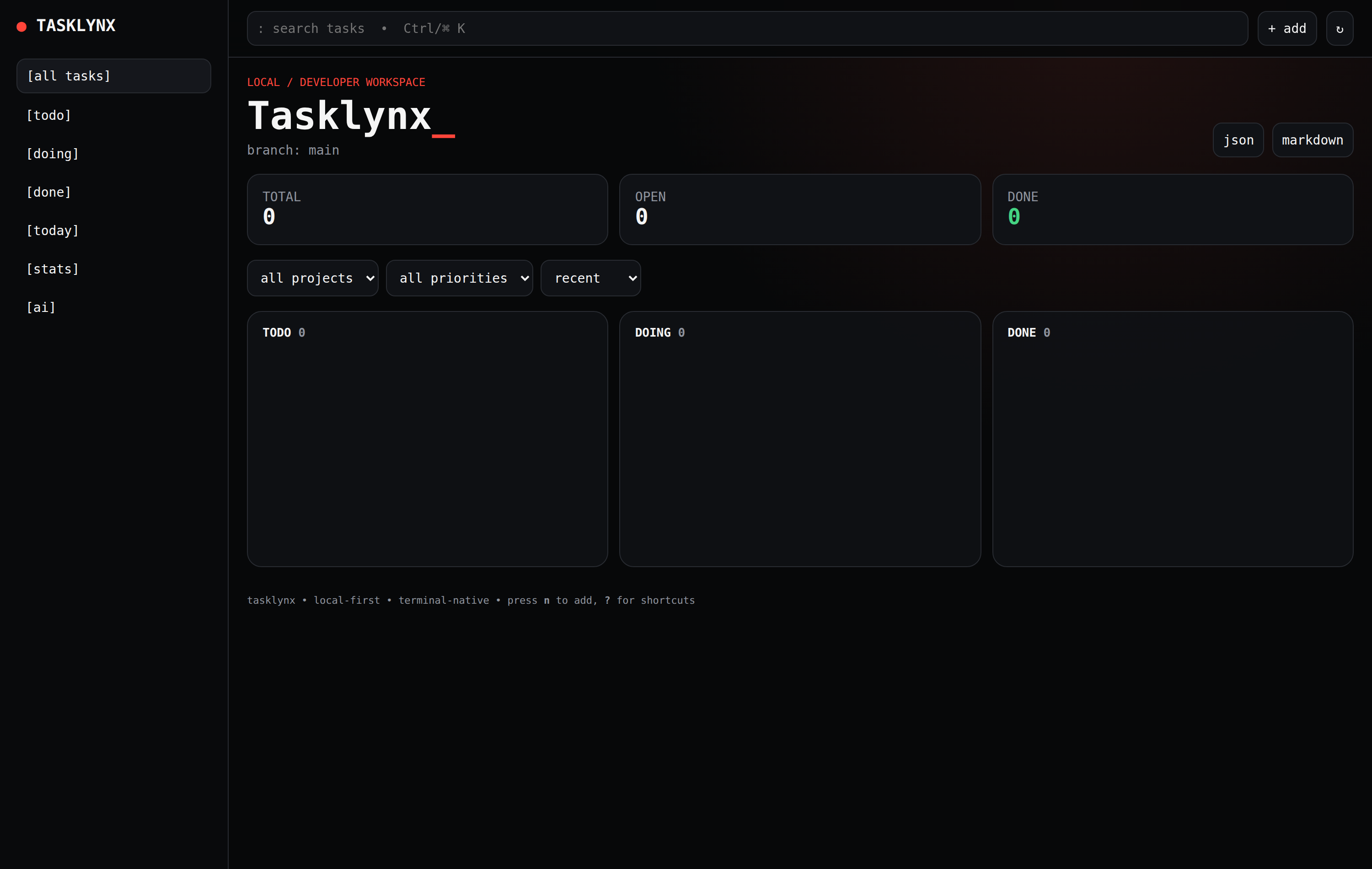
The responsive browser dashboard served by `tx web` at `http://127.0.0.1:8787`, displaying real-time metrics, project filters, and drag-and-drop columns.
## Task creation & editing modal
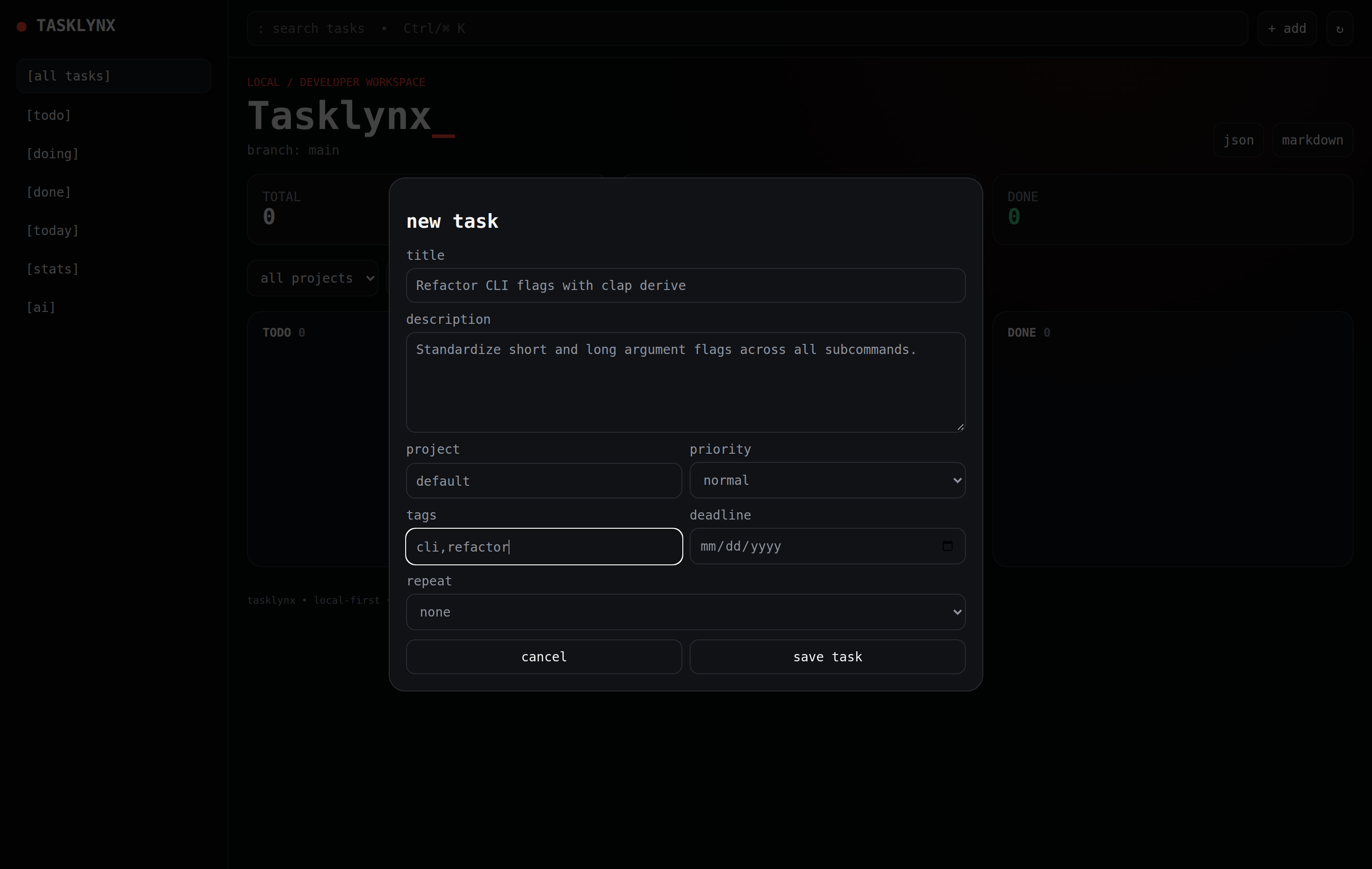
The task modal in `tx web` for creating and editing tasks with priorities (`urgent`, `high`, `normal`, `low`), deadlines, and comma-separated tags.
## Kanban board view
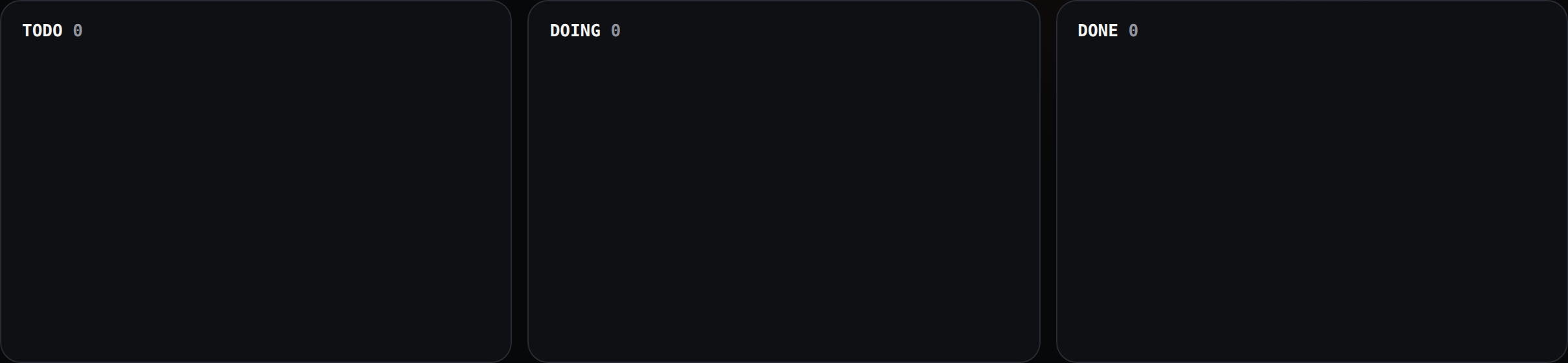
The three-column workflow board (`TODO`, `DOING`, `DONE`) with color-coded priority badges and metadata tags. Also accessible in the terminal via `tx board`.
## Automated screenshot capture
Tasklynx includes automated tooling in [`tools/capture_real_screenshots.js`](https://github.com/peekstore/tasklynx/blob/main/tools/capture_real_screenshots.js) and a GitHub Actions workflow [`.github/workflows/screenshots.yml`](https://github.com/peekstore/tasklynx/blob/main/.github/workflows/screenshots.yml) that automatically spins up an ephemeral `tasklynx web` server and captures pixel-perfect high-DPI screenshots using headless browser automation.
The automation supports multiple browser drivers:
- **Chromium / Google Chrome**: Headless browser rendering at 2x device pixel ratio.
- **Puppeteer & Puppeteer-Core**: Fast programmatic viewport capture and interaction.
- **Playwright & Playwright-Core**: Cross-browser validation and automated UI test flows.
- **Chromedriver**: Standard W3C WebDriver automated testing.
To capture screenshots locally:
```bash
cargo build --release
cd tools
npm install
npm run screenshots
```
[Back to README](https://github.com/peekstore/tasklynx/blob/main/README.md)
<!-- End of markdown mirror. -->
--- (site) ---
<!-- Generated by Void for AI agents. -->
<!-- Site: Tasklynx -->
<!-- URL: https://peekstore.github.io/tasklynx/troubleshooting.md -->
<!-- Generated: 2026-11-01T11:43:09Z -->
<!-- Version: 0.3.0 -->
# Troubleshooting
## `tx: command not found`
The install directory is not on your `PATH`.
- Linux, macOS, Termux: add this to your shell rc file and restart the shell:
```sh
export PATH="${XDG_CONFIG_HOME:-$HOME/.config}/peekstore/tasklynx/bin:$PATH"
```
- Windows: open a new terminal after installing, or confirm `%USERPROFILE%\.config\peekstore\tasklynx\bin` is in your user `PATH`.
Reinstalling also re-adds the path:
```bash
curl -fsSL https://raw.githubusercontent.com/peekstore/tasklynx/main/installer.sh | sh
```
## The wrong binary was installed (Android or ARM)
Check the platform and artifact the installer would choose:
```bash
DRY_RUN=1 sh installer.sh
```
On Termux, confirm the ABI:
```bash
getprop ro.product.cpu.abi
```
Expected artifacts are `tasklynx-android-arm64-v8a`, `tasklynx-android-armeabi-v7a`, or `tasklynx-android-x86_64`. If detection is wrong, force Termux mode with `TERMUX_VERSION=1`.
## Installer fails with 404
The version being requested has no published assets yet.
- Omit `TASKLYNX_VERSION` to install the latest published release.
- Or pick a tag that is fully published on the [Releases page](https://github.com/peekstore/tasklynx/releases).
## Port already in use
`tx web` prints a bind error when the port is taken. Use another port:
```bash
tx web --port 9000
```
Or change `port` in `~/.config/peekstore/tasklynx/config.toml`.
## The dashboard is reachable from other machines
The default bind address is `127.0.0.1`. If you set `host = "0.0.0.0"` or pass `--host 0.0.0.0`, the server is exposed without authentication. Put it behind an authenticated proxy or bind back to localhost.
## Tasks disappeared after changing `TASKLYNX_HOME`
`TASKLYNX_HOME` relocates the store; the file lives at `$TASKLYNX_HOME/tasklynx/tasks.json`. Point it at the same value you used before, or move `tasks.json` into the new location.
Find the active store path:
```bash
tx init
```
`tx init` prints the resolved `tasks.json` path.
## Data looks corrupted or a write was interrupted
Tasklynx writes atomically, so `tasks.json` should always be complete JSON. If it is not:
1. Keep a copy of the damaged file.
2. Validate it with `jq . tasks.json`.
3. Restore the most recent backup, or start fresh by moving the file aside and running `tx init`.
## `task not found` or ambiguous ID
IDs accept any unique prefix. Copy the short ID from `tx list`, or use the full UUID printed by `tx add`.
## `cannot delete current branch` or `branch is not empty`
- Switch to another branch before deleting it.
- Move or delete the branch's tasks first. `tx list --all` shows every task; `--status` filters help narrow them down.
## Build fails from source
```bash
rustup update stable
cargo clean
cargo build --release
```
Check that you are on Rust 1.75 or newer with `rustc --version`. For Android cross-builds, confirm the NDK path used by `build-android-termux.sh`.
## `tx ai` says provider support is unavailable
The official release binaries are built without the `ai` feature. Offline triage still works, but Ollama and OpenAI-compatible providers require a source build:
```bash
cargo install --git https://github.com/peekstore/tasklynx.git --locked --features ai
```
## `tx ai doctor` cannot reach the provider
- Confirm `ai.endpoint` is correct: `http://127.0.0.1:11434` for Ollama or an OpenAI-compatible URL that includes the API version, such as `https://api.openai.com/v1`.
- Ollama must be running and the configured model must be pulled: `ollama list`.
- OpenAI-compatible endpoints check `<endpoint>/models`; confirm the endpoint and `TASKLYNX_AI_API_KEY` are correct.
- Run `tx ai doctor` again after changing `config.toml`.
## CI installer test failed on a push
Installer tests run against the newest **published** release. If a release was just tagged but has not finished uploading assets, the test will fail. Re-run the job after the release workflow completes, or dispatch **Installer Test All** manually.
## Still stuck?
Open an issue with the output of `tx --version`, your OS/architecture, the exact command, and the full error:
<https://github.com/peekstore/tasklynx/issues>
[Back to README](https://github.com/peekstore/tasklynx/blob/main/README.md)
<!-- End of markdown mirror. -->